

If you need live captions to follow a remote job interview, ask the recruiter to confirm the platform, the kind of captions available, and who will set them up. Arrange a short check before scored questions begin. Test whether you can follow two speakers and a number accurately, then agree on a fallback you can actually use.
Ask the recruiter about the caption setup
Reply to the scheduling contact or use the employer’s designated accommodation channel. Identify the interview, including the time zone shown in the invitation, and explain the access barrier and the support that would help. Ask who will coordinate it. If you need a person to caption the conversation, say so. Communication Access Realtime Translation (CART) uses a trained human captioner. Automatic captions use speech recognition, and overlapping speakers or a noisy microphone can make them harder to follow.
For U.S. applicants, EEOC guidance on the hiring process explains that covered employers generally must provide effective reasonable accommodations for qualified applicants with disabilities unless doing so would cause undue hardship. A request can be made verbally or in writing. The employer may discuss the request and, when the disability or need is unclear, may ask for reasonable supporting documentation. If documentation is requested, ask which designated channel to use. State and local protections may differ.
Microsoft’s candidate accessibility page lists Teams automatic captions and a real-time transcriptionist as distinct examples in its own hiring process. Ask your recruiter what the employer can arrange for your interview. Microsoft’s Teams caption guide explains how participants can display captions and why background noise and simultaneous speakers can affect accuracy. Its Teams CART setup guide explains the meeting organizer’s role in making human-generated captions available.
A message you can adapt
Thanks for scheduling my video interview for [date, time, and time zone]. Because of a disability, I need accurate real-time text to follow the panel’s spoken questions. I use [automatic captions when they are clear / a human CART captioner]. Could you confirm the meeting app, who will arrange the captions, and whether we can check them before the interview begins? If the setup fails, I’d like to agree on a backup before we start.
Run a two-speaker caption check
Ask for a brief check with the meeting organizer, ideally using the same app, device, and guest access you’ll use for the actual interview. A test in a meeting you host is useful for finding the controls. To confirm the employer’s setup, test as a guest with that organizer or leave time to check at the start of the interview.
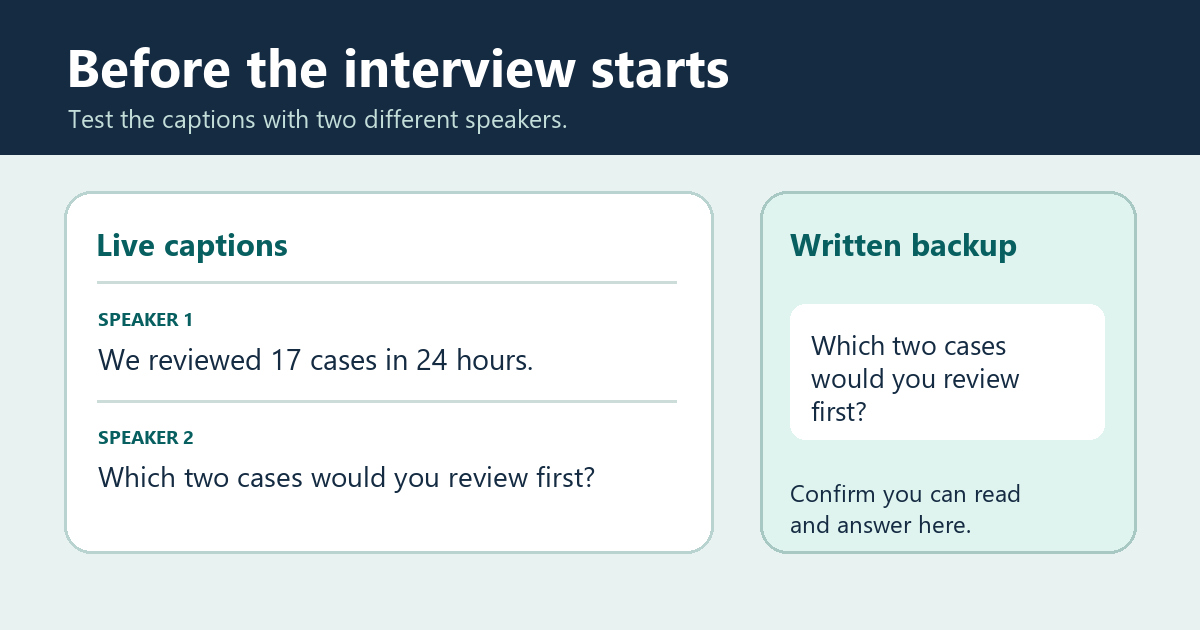
- Check the first voice. Ask one person to say, “We reviewed 17 cases in 24 hours.” Check whether you can read both numbers before you would need to answer.
- Check the handoff. Ask a second person to speak after the first finishes. Have them say, “Which two cases would you review first?” Check that you can follow the change of speaker and read the full question.
- Check the fallback. Ask the organizer to paste that same question into the agreed written channel. Open it from your interview device and confirm you can read it and respond in the agreed format. If you’ll also present slides, confirm the captions stay readable in the viewing layout you’ll use.
The test sentences are fictional. The check passes when the text is readable quickly enough for you to answer and the fallback channel works for you. If human captioning is the agreed support, check that the organizer has arranged it for the actual interview slot. A readable automatic caption test does not confirm that a captioner has been booked.
Agree on what to do if captions fail
Before the first scored question, confirm who will pause the interview if captions stop or become difficult to follow. If the agreed written format works for you and the recruiter confirms it fits the interview, ask the panel to paste and repeat the interrupted prompt there. If you still cannot follow the discussion, ask the scheduling contact to restore the agreed access or arrange another time before continuing. Keep that contact and the invitation handy so you can reach them if the meeting closes.
Preparing for a demonstration as well? Use the remote interview screen-sharing rehearsal alongside the caption check. For earlier application steps, see the WorkinVirtual guide to disability, accommodation, and privacy in job searching.
Choose your next step
Keep your momentum with practical tools and verified remote-work opportunities.
Related guides for your next step
A fresh, topic-aware mix from the WorkinVirtual library. Suggestions rotate regularly.

Discuss this guide
Ask a useful question, share relevant experience, or add a practical correction. Helpful contributions publish immediately after automated safety checks.
Start a thoughtful discussion
Be the first member to add a question or practical insight about this topic.
Join the discussion
Sign in with your verified WorkinVirtual account to contribute. Automated safety checks keep posting quick and protect the community.
Sign in to contribute