

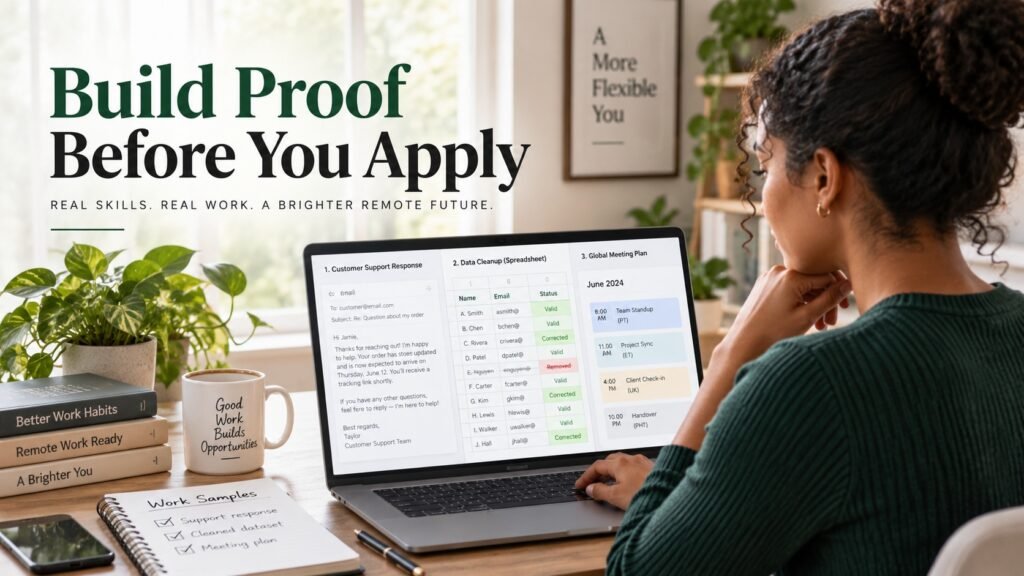
You do not need previous remote employment to create evidence of skills that a remote job may require. You can build three small, self-directed work samples based on real responsibilities in the role you want. These samples can strengthen an honest application, but they do not replace required experience, qualifications, work authorization, location eligibility, or schedule requirements.
- Choose one role family before creating samples.
- Build three examples that reflect responsibilities employers actually advertise.
- Label every self-directed project honestly and be ready to explain your decisions.
In this guide, a proof pack simply means a small collection of relevant work samples. It is practical shorthand, not an official qualification, certification, or WorkinVirtual credential.
Choose one role and check eligibility first
Start by reviewing three current, official job descriptions in the same role family. If you want customer support work, review customer support roles. If you want data entry, stay within data-focused administrative roles. Do not build unrelated samples just to make a portfolio look larger.
As you read each description, separate the requirements into three groups:
- Eligibility: permitted country or region, work authorization, required time zone, schedule, or other conditions determining whether you can actually take the job.
- Required experience or qualifications: previous experience, education, certifications, language ability, or other stated requirements.
- Skills you can demonstrate: written communication, accurate record handling, spreadsheet organization, scheduling, documentation, prioritization, or similar tasks.
A work sample can provide evidence for the third group. It cannot make you eligible for a vacancy whose location, authorization, schedule, experience, or qualification requirements you do not meet.
For example, current customer-support descriptions include professional written communication, accurate documentation, issue handling and escalation. Current data-entry work can involve checking records for missing, inconsistent or duplicate information. Administrative and executive-assistant descriptions commonly include calendar coordination, correspondence and organized information handling.
If customer support is your target, you can also review current remote customer support jobs to see how responsibilities and eligibility vary between listings.
Build three samples relevant to your chosen role
Create three samples within one role family. A customer-support applicant should not create one support email, one data-entry spreadsheet and one executive calendar unless the target job genuinely combines those duties.
| Role | Sample | What it demonstrates | Quality check |
|---|---|---|---|
| Customer support | Three fictional customer responses | Written communication, judgment, procedure-following | Check tone, accuracy and whether every promised action is authorized |
| Data entry | Small cleaned dataset plus correction log | Accuracy, consistency, duplicate detection, documentation | Compare corrected data with the original row by row |
| Virtual assistance | Calendar, meeting plan and handoff note | Scheduling, prioritization, time-zone awareness | Check conflicts, dates, time zones and instructions |
Customer support example: invent a simple refund policy stating that unopened items may be returned within 14 days after approval. Write a response to a fictional customer whose order arrived damaged. A useful sample acknowledges the problem, explains the correct next step and avoids promising a refund before the fictional policy allows one.
Data entry example: create a 12-row fictional contact list containing one duplicate record, inconsistent date formats and one misspelled category. Produce a cleaned copy and a separate correction log showing what changed and why. The log matters because it shows that you can make corrections transparently rather than silently altering data.
Virtual assistance example: schedule a fictional meeting between colleagues in London, New York and Karachi. Show each participant’s time zone, check for conflicts, then write a brief handoff note stating the agreed time, meeting purpose and any follow-up required.
These are editorial practice exercises, not employer assessments. Adjust the tasks to the responsibilities you see repeatedly in the actual jobs you plan to pursue.
Package the samples honestly
Every sample should make its status clear. A simple description format is:
“Self-directed sample: [task]. Created with [tool]. Checked using [method]. Demonstrates [relevant skill].”
For example:
Relevant Projects
Customer Support Response Samples — Self-Directed Project
Created three fictional customer-support scenarios in Google Docs covering a refund request, delayed delivery and account-access issue. Checked each response against the fictional policy provided with the exercise. Demonstrates written communication, issue identification and procedure-following.
Do not turn a practice exercise into invented employment. Do not add fictional clients, performance percentages, business results, paid contracts or employer names that did not exist.
If an application accepts supporting links, share a clearly named view-only folder or individual file. Test the link in a private browser window before submitting it, confirm that the reviewer does not need edit access, and remove personal information.
Use fictional information or public data that you are permitted to reuse. Never expose customer records, internal documents, private emails, confidential employer information or material taken from a previous workplace without authorization.
If AI helps you draft, clean or organize a sample, check every output yourself. You should understand the final work well enough to explain your decisions, follow any employer assessment rules, and describe your own contribution accurately.
WorkinVirtual’s Remote Work Passport is currently a candidate-controlled profile where candidates can present evidence-backed professional information and separately control public visibility and employer permissions. Creating one does not guarantee discovery, invitations, interviews or employment.
Complete a manageable 48-hour plan
Two days can be a useful way to stop a small portfolio project from expanding indefinitely. It is an optional planning framework, not a hiring shortcut, deadline or guarantee.
Day 1
- Choose one role family.
- Review three official job descriptions.
- Separate eligibility, required experience and demonstrable skills.
- Choose three closely related sample tasks.
- Create the first two samples.
- Check facts, spelling, formatting and accuracy.
Day 2
- Complete the third sample.
- Run a final quality check on all three.
- Remove private information and test view-only permissions.
- Add one honest project entry to your résumé.
- Prepare a short explanation of how and why you created each sample.
- Select vacancies whose responsibilities and eligibility actually fit you.
Use this quick self-check before sharing
This is a practical review checklist, not a validated readiness score:
- Does the sample match an advertised responsibility?
- Can I explain my decisions?
- Have I checked accuracy?
- Is it clearly labelled as self-directed work?
- Can the reviewer open it safely?
If the answer is yes to all five, the sample is probably ready to support an application. It still does not prove that you meet every requirement in the vacancy, so read the listing again before applying.
Can practice projects go on a résumé?
Yes. Put relevant self-directed work under a heading such as “Relevant Projects” or “Work Samples,” and clearly identify it as self-directed. Describe the task, tools, checking method and skill demonstrated without presenting it as employment.
Do work samples replace required experience?
No. A sample can demonstrate a skill, but an employer may still require a stated amount or type of professional experience. Treat required experience separately from evidence you have created yourself.
What if an application has no portfolio field?
Do not force a link into an unrelated field. If the application provides an appropriate résumé, cover-letter, website or portfolio field, use it. Otherwise, keep your samples ready in case the employer later requests supporting work.
Browse remote jobs on WorkinVirtual and choose a role your samples support.
Choose your next step
Keep your momentum with practical tools and verified remote-work opportunities.
Related guides for your next step
A fresh, topic-aware mix from the WorkinVirtual library. Suggestions rotate regularly.





Discuss this guide
Ask a useful question, share relevant experience, or add a practical correction. Helpful contributions publish immediately after automated safety checks.
Start a thoughtful discussion
Be the first member to add a question or practical insight about this topic.
Join the discussion
Sign in with your verified WorkinVirtual account to contribute. Automated safety checks keep posting quick and protect the community.
Sign in to contribute