

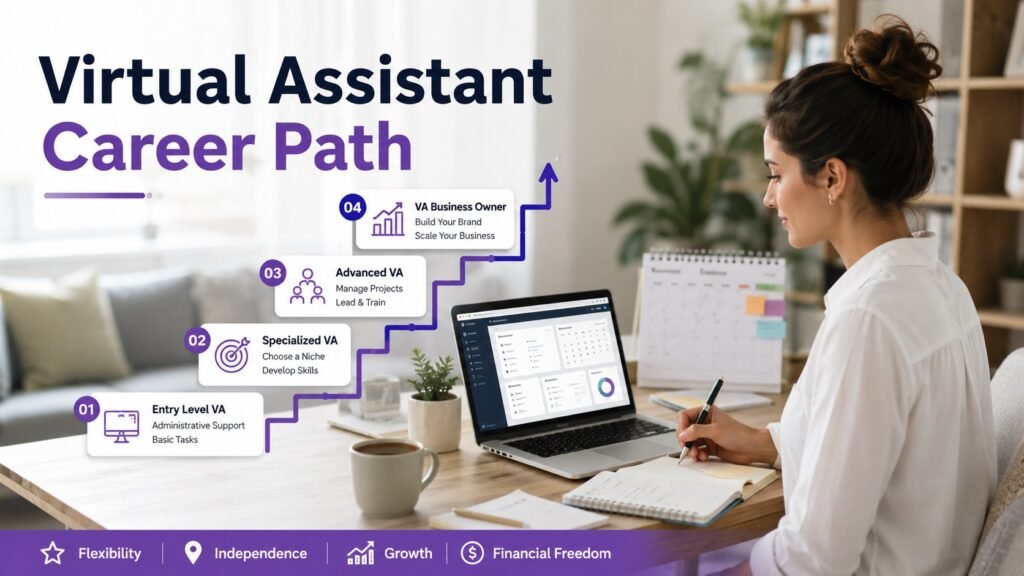
Many people search for virtual assistant jobs because they want flexible work from home. But the bigger question is not only, “Can I become a virtual assistant?”
The better question is: Where can this career take me in the next five years?
Virtual assistant work can start with simple tasks like inbox management, scheduling, research, and admin support. Over time, those same skills can grow into executive assistant roles, operations coordination, project support, and even remote business management.
This guide is written for beginners who want a realistic picture of the virtual assistant career path, including what each stage may look like, which skills matter, how responsibilities grow, and what kind of future this role can create.
For more related career guides, visit the virtual assistant jobs hub on WorkinVirtual.
Can Virtual Assistant Work Become a Real Career?
Yes, virtual assistant work can become a long-term remote career when the person keeps building stronger business, communication, and organization skills.
Many beginners start by helping with simple administrative tasks. As they become more trusted, they may begin handling executive calendars, client communication, internal processes, documentation, team coordination, and project follow-ups.
That is why virtual assistant work can be more than a temporary online job. It can become a foundation for several remote career paths.
Explore broader remote career opportunities on WorkinVirtual.
Browse Remote Jobs HubWho Is This Career Path Best For?
A virtual assistant career may be a good fit if you enjoy helping people stay organized, communicating clearly, solving small problems, and keeping work moving behind the scenes.
Good Fit: Organized and Detail-Focused People
If you like calendars, checklists, email folders, spreadsheets, and organized systems, virtual assistant work can feel natural.
Many employers value reliability and attention to detail more than advanced technical knowledge at the beginner level.
Good Fit: Strong Communicators
Virtual assistants often write emails, confirm meetings, send reminders, summarize information, and coordinate with team members.
Clear written communication can help beginners stand out quickly.
May Be Difficult: People Who Dislike Routine
Some virtual assistant tasks repeat daily. Inbox checks, schedule updates, file organization, and follow-ups require consistency.
If you dislike routine or lose focus easily, this career may require extra discipline.
Transferable Skills You May Already Have
Many beginners do not realize they already have experience that can transfer into virtual assistant work.
Retail or Hospitality Experience
If you have handled customers, solved small problems, answered questions, or stayed calm under pressure, you already have communication skills that can help in remote assistant roles.
Receptionist or Office Experience
Receptionist experience can transfer strongly into virtual assistant work because both roles involve appointments, messages, organization, and professional communication.
Customer Service Experience
Customer service workers often understand tone, patience, follow-up, and written communication. These skills are useful for inbox management and admin support.
Student or Research Background
If you can search, compare information, summarize details, and organize findings clearly, you may be able to support research-based virtual assistant tasks.
Beginners can also explore related entry-level remote jobs while building virtual assistant skills.
A Realistic Day in the Life of a Beginner Virtual Assistant
A beginner virtual assistant’s day is usually built around organization, communication, and follow-up.
Morning: Inbox and Priority Review
The day may begin by checking emails, identifying urgent messages, updating task lists, confirming meetings, and preparing a simple priority list.
Midday: Scheduling and Admin Support
This part of the day may include scheduling meetings, updating calendars, organizing documents, entering information into spreadsheets, or coordinating with team members.
Afternoon: Research and Follow-Up
The assistant may complete a research task, send follow-up emails, prepare notes, organize files, or help the business owner or manager prepare for the next day.
A Realistic 5-Year Virtual Assistant Career Timeline
This is the section most beginners need. A virtual assistant career does not usually grow overnight. It grows through trust, reliability, better tools, stronger communication, and more ownership.
Year 1: Beginner Virtual Assistant
In the first year, most beginners focus on simple but important tasks such as inbox management, scheduling, online research, document organization, and basic admin support.
The main goal is to become dependable. Employers want to see that you can follow instructions, respond professionally, meet deadlines, and keep information organized.
Best skills to learn: Google Calendar, Gmail or Outlook, Google Docs, spreadsheets, task lists, and professional email writing.
Year 2: Trusted Remote Assistant
By the second year, a virtual assistant may begin taking ownership of recurring tasks. This can include managing a calendar without constant supervision, preparing weekly reports, handling follow-ups, and coordinating simple workflows.
This is where the role becomes more valuable because the assistant is no longer just completing tasks. They are helping reduce mental load for a business owner, manager, or team.
Best skills to learn: meeting coordination, documentation, client communication, simple reporting, and task management tools.
Year 3: Executive Assistant or Operations Assistant
By year three, some virtual assistants move toward executive assistant or operations assistant roles. These positions may involve supporting senior leaders, managing priorities, documenting processes, and helping teams stay aligned.
The work becomes less about completing small tasks and more about understanding how the business operates.
Best skills to learn: executive communication, process documentation, project coordination, CRM tools, and meeting preparation.
Year 4: Operations Coordinator or Project Support
By year four, a strong virtual assistant may move into operations coordination or project support. This stage may include onboarding new clients, improving workflows, tracking project deadlines, organizing internal systems, and helping teams work more efficiently.
This is a major step because the person is now supporting business structure, not just daily admin work.
Best skills to learn: workflow management, project tracking, SOP writing, team coordination, and process improvement.
Year 5: Operations Manager, Business Support Lead, or Senior Executive Assistant
By year five, experienced virtual assistants may move into senior support or operations roles. Some become senior executive assistants, operations managers, business support leads, or independent VA business owners.
At this stage, the work may involve decision support, team coordination, internal systems, hiring support, executive planning, or managing client operations.
Best skills to learn: leadership communication, business operations, reporting, team management, and strategic planning.
Ready to look for roles that match your current stage?
Browse Remote JobsHow Earnings Typically Grow in a Virtual Assistant Career
Income can vary widely depending on location, experience, employment type, industry, and whether the role is freelance or full-time. A beginner should avoid unrealistic promises, but it is fair to understand how responsibility usually affects earning potential.
Beginner Virtual Assistant
Beginner VAs usually earn based on simple admin support, scheduling, inbox organization, and research tasks. The strongest way to increase value at this stage is to become reliable and easy to work with.
Executive Assistant
Executive assistant roles often pay more because they involve supporting leaders, protecting time, managing confidential information, and making better decisions about priorities.
Operations Coordinator
Operations coordinators may earn more because they help manage systems, processes, documentation, and team coordination. These responsibilities directly affect how smoothly a business runs.
Operations Manager or Business Support Lead
At this stage, compensation usually reflects leadership, decision support, team coordination, and operational responsibility. This is where virtual assistant experience can become a serious long-term career foundation.
Skills That Increase Promotion Opportunities
Promotion does not usually happen just because someone has spent time in a role. It happens when the person becomes more useful to the business.
Written Communication
Remote teams rely heavily on written communication. A virtual assistant who writes clearly can reduce confusion and save time for everyone involved.
Calendar and Meeting Management
Strong calendar management can help a business leader protect time, avoid conflicts, and stay focused on important priorities.
Documentation
Assistants who document processes become more valuable because they help businesses create repeatable systems instead of relying on memory.
Project Coordination
Project coordination skills help virtual assistants move beyond task support into team support. This can open doors to coordinator and operations roles.
Process Improvement
When a virtual assistant can notice repeated problems and suggest better workflows, they become more than support. They become part of business improvement.
Companies That Value Virtual Assistant Skills
The companies below are not listed as guaranteed openings. They are examples of organizations where remote communication, documentation, coordination, and operational support skills are highly relevant.
Automattic
Automattic is known for distributed work. In remote-first environments like this, written communication, documentation, calendar awareness, and team coordination are valuable skills.
A beginner may not start in a senior role, but learning async communication and documentation can make a VA more competitive over time.
Visit Careers PageZapier
Zapier is built around productivity, automation, and remote collaboration. Virtual assistants who understand workflows, tools, documentation, and process improvement may find this type of company culture useful to study.
For beginners, Zapier is a good example of why systems thinking can increase career value.
Visit Careers PageDeel
Deel works in a global employment and remote team environment. Companies like this depend on coordination, documentation, accuracy, and communication across time zones.
These are the same skills that can help virtual assistants grow into operations and coordination roles.
Visit Careers PageVirtual Assistant vs Similar Beginner Remote Jobs
Virtual assistant work is not the only beginner remote path. But it can offer broader career growth than some narrow entry-level roles because it exposes workers to business operations.
Virtual Assistant vs Data Entry
Data entry may be easier to understand at the beginning, but virtual assistant work often provides more exposure to communication, scheduling, business tools, and operations.
Virtual Assistant vs Customer Support
Customer support is usually more customer-facing. Virtual assistant work is often more administrative, organizational, and operations-focused.
Virtual Assistant vs Executive Assistant
Executive assistant roles usually require stronger judgment, confidentiality, and prioritization. Many beginners can use virtual assistant work as a stepping stone toward executive support.
How To Move From Beginner VA to Higher-Level Roles
The fastest way to grow is not to chase every task. It is to become trusted with more important work.
Step 1: Master the Basics
Become excellent at inbox management, scheduling, follow-ups, file organization, and simple research tasks.
Step 2: Document What You Do
Create simple process notes. This shows that you understand systems and can help a business become more organized.
Step 3: Take Ownership of Recurring Work
Ask to manage recurring meetings, reports, task boards, onboarding steps, or weekly updates. Ownership is what separates beginners from trusted assistants.
Step 4: Learn Business Tools
Become comfortable with tools like Google Workspace, Microsoft Outlook, Notion, Trello, Asana, Slack, Zoom, Calendly, and basic CRM systems.
Step 5: Move Toward a Specialty
After gaining experience, choose a path such as executive support, ecommerce operations, social media admin, client onboarding, project coordination, or operations support.
Want employers to discover your remote skills?
Upload Your ResumeFinal Thoughts: Is the Virtual Assistant Career Path Worth It?
For the right person, yes.
Virtual assistant work can be a strong career path for people who enjoy organization, communication, planning, and business support. It may begin with simple tasks, but it can grow into executive assistant, operations coordinator, project support, or management roles over time.
The key is to treat the role as a starting point, not a stopping point.
A beginner VA who learns communication, documentation, scheduling, project coordination, and process improvement can build a much stronger future than someone who only completes basic tasks.
Editor’s Note: Virtual assistant career progression varies by employer, specialization, industry, and experience level. Some professionals remain independent contractors, while others transition into executive support, operations, project coordination, or management roles. The strongest growth usually comes from reliability, written communication, business understanding, and the ability to take ownership over time.
Continue exploring virtual assistant career guides.
Visit Virtual Assistant Jobs HubChoose your next step
Keep your momentum with practical tools and verified remote-work opportunities.
Related guides for your next step
A fresh, topic-aware mix from the WorkinVirtual library. Suggestions rotate regularly.





Discuss this guide
Ask a useful question, share relevant experience, or add a practical correction. Helpful contributions publish immediately after automated safety checks.
Start a thoughtful discussion
Be the first member to add a question or practical insight about this topic.
Join the discussion
Sign in with your verified WorkinVirtual account to contribute. Automated safety checks keep posting quick and protect the community.
Sign in to contribute